> **Can't find what you're looking for?** Use `search_docs` on the docs MCP server at `https://aetherskywarswiki.netlify.app/api/mcp` to find what you need.
# Commands
The full command list, split into player commands and admin commands.
 The main command is `/aetherskywars`. It also answers to `/asw`, `/as`, `/askywars`, `/sw`,
and `/rsw`. This page uses `/asw`.
Arguments in `` are required. Arguments in `[square brackets]` are optional.
## In-game help
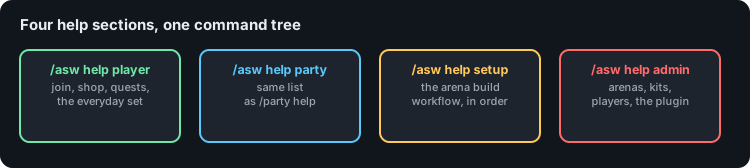
You do not have to keep this page open. `/asw help` lists the same commands in game, split
into the same sections.
```text
/asw help # [1]
/asw help player # [2]
/asw help admin 2 # [3]
```
1. The section index.
2. One section. The sections are `player`, `party`, `setup`, and `admin`.
3. Page two of a section, for the long ones.
| Section | What is in it |
| --- | --- |
| `player` | Everyday commands, the ones anyone might use. |
| `party` | The party commands. Same as `/party help`. |
| `setup` | The arena build workflow, listed in the order you need it. |
| `admin` | Managing arenas, kits, players, and the plugin. |
Two things worth knowing:
* **You only see what you can run.** Commands you have no permission for are hidden, so a
player asking for help gets a short list rather than a wall of admin commands.
* **The lines are clickable.** Clicking a command puts it in your chat box, and hovering shows
what it does and which permission it needs.
:::tip
Typing a subcommand that does not exist shows the section index too, so a typo points
you at the right command instead of a dead end.
:::
## Player commands
| Command | What it does | Permission |
| --- | --- | --- |
| `/asw` | Opens the main menu. From the console, prints the help index. | none |
| `/asw help [section] [page]` | Shows the in-game help. Aliases `?`, `commands`. | none |
| `/asw list` | Opens the arena browser. | `asw.list` |
| `/asw maps` | Lists arenas in chat. | none |
| `/asw play ` | Joins the next available arena of that mode. | none |
| `/asw leave` | Leaves the current match. Same as `/leave`. | `asw.leave` |
| `/asw lobby` | Teleports to the lobby. | `asw.lobby` |
| `/asw kits` | Opens the kit menu. | `asw.kits` |
| `/asw shop` | Opens the cosmetics shop. | `asw.shop` |
| `/asw spectatorshop` | Opens the spectator shop. Alias `specshop`. | `asw.spectatorshop` |
| `/asw balance` | Shows your coin balance. Alias `bal`. | `asw.coins` |
| `/asw forcestart` | Starts the match you are in without waiting for the countdown. | `asw.forcestart` |
| `/asw cosmetics` | Opens the wardrobe. Alias `wardrobe`. | `asw.play` |
| `/asw quests` | Opens the daily and weekly quest list. Aliases `quest`, `missions`. | `asw.play` |
| `/asw challenges` | Opens the challenge list for the match you are in. Alias `challenge`. | `asw.play` |
| `/asw mysterybox` | Opens a mystery box. | `asw.play` |
`/leave` is a top-level command in its own right, with the aliases `/sair` and `/ragequit`.
Four of these are also commands of their own, so a player does not have to remember they live under
`/asw`:
| Command | Opens | Also answers to |
| --- | --- | --- |
| `/cosmetics` | The wardrobe | `/wardrobe`, `/cosmetic` |
| `/quests` | The quest list | `/quest`, `/missions`, `/mission` |
| `/challenges` | The challenge list | `/challenge`, `/chall` |
| `/mysterybox` | A mystery box | `/box`, `/mbox` |
`/cosmetics shop` opens the shop, since a player looking for cosmetics to buy usually starts by
opening the wardrobe.
### Party commands
See [Parties](/features/parties) for how they behave.
| Command | What it does | Permission |
| --- | --- | --- |
| `/party create` | Starts a party. | `asw.party.owner` |
| `/party invite ` | Invites a player. | `asw.party.invite` |
| `/party accept` | Accepts an invite. | `asw.party.accept` |
| `/party kick ` | Removes a member. | `asw.party.owner` |
| `/party leave` | Leaves your party. | `asw.party.leave` |
| `/party disband` | Closes the party. | `asw.party.owner` |
| `/party help` | Lists the party commands. | none |
Aliases: `/p`, `/prty`, `/pty`, `/festa`, `/swp`, `/aswparty`. `/party` on its own shows the same list as
`/party help`.
## Friends
| Command | What it does | Permission |
| --- | --- | --- |
| `/friend add ` | Ask someone to be your friend. | `asw.friend` |
| `/friend accept ` | Accept a friend request. | `asw.friend` |
| `/friend deny ` | Turn down a request. The sender is not told. | `asw.friend` |
| `/friend remove ` | Remove someone from your friends. | `asw.friend` |
| `/friend list` | Everyone on your list, online first. | `asw.friend` |
| `/friend requests` | The requests waiting for you. | `asw.friend` |
| `/friend msg ` | Message a friend. Works with no messaging plugin installed, and respects who they allow messages from. | `asw.friend` |
| `/friend notify ` | Whether you are told when a friend comes online. | `asw.friend` |
| `/friend hide` | Appear offline to your friends. | `asw.friend` |
| `/friend menu` | Open the friends menu. | `asw.friend` |
Aliases: `/f`, `/friends`, `/fr`. `/f` used to belong to `/party`, which now answers to `/prty`
and `/pty` instead.
The player argument completes as you type. `add` offers everyone online, `accept` and `deny` offer
the people who have asked you, and `remove` and `msg` offer the friends you already have.
See [Friends](/features/friends).
## Admin commands
Everything below needs `asw.admin`.
### Arenas
| Command | What it does |
| --- | --- |
| `/asw create ` | Creates a Solo arena, one player per island. For `schematic`, `` is the file name with its extension. |
| `/asw create ` | Creates a Teams arena. Same island count, more players on each, so `8 2` is 8 islands of 2 and 16 players. `0` or `1` is the same as leaving it off. |
| `/asw editmap ` | Takes the arena offline and gives you the setup hotbar. Alias `edit`. |
| `/asw map ` | Opens the arena's settings menu. |
| `/asw finish` | Finishes setup on the arena you are editing and registers it. |
| `/asw setspectator` | Sets the spectator point to where you are standing. |
| `/asw setlobby` | Sets the server lobby to where you are standing. |
| `/asw tp ` | Teleports you into the arena world. |
| `/asw rename ` | Changes the name shown to players. |
| `/asw duplicate ` | Copies an arena and its world. Aliases `dup`, `copy`. |
| `/asw reset ` | Forces a world reset. |
| `/asw fixconnect ` | Reconnects fences, walls, glass panes, iron bars, stair corners, fence gates and double chests inside the arena boundary. Runs on its own after an old `.schematic` is pasted. Alias `fixconnections`. |
| `/asw register ` | Makes an arena visible to players. Alias `ref`. |
| `/asw unregister ` | Hides an arena without deleting it. Alias `unreg`. |
| `/asw delete ` | Deletes the arena and its world. Alias `del`. |
:::warning
`/asw delete` removes the world from disk and cannot be undone. It asks first: you have 30
seconds to run the same command again with `confirm` on the end, or with `cancel` to call it
off. `/asw reset` asks the same way when players are in the arena. Copy the world folder first
if you might want it back.
:::
### Chests and kits
| Command | What it does |
| --- | --- |
| `/asw seetier ` | Opens that loot table as a browsable menu. Click an item to change its drop chance. |
| `/asw set2chest ` | Writes your current inventory into that loot table. |
| `/asw kit CREATE [cost]` | Saves your inventory as a kit. |
| `/asw kit DELETE ` | Removes a kit. |
| `/asw kit GIVE ` | Gives yourself a kit's contents. |
| `/asw item2config` | Prints the item you are holding in config format, ready to paste. |
See [Chests and loot](/features/chests-and-loot) and [Kits](/features/kits).
### Players and economy
| Command | What it does |
| --- | --- |
| `/asw players` | Lists players currently in matches. |
| `/asw player ` | Opens that player's [card](/features/player-card), titled `(admin view)`. Your own name gets `(admin self view)`. |
| `/asw coins ` | Adjusts a balance. `SEND` transfers from your own balance, the rest are staff operations. |
### Server
| Command | What it does |
| --- | --- |
| `/asw reload` | Re-reads the config and language files. Arenas are only rebuilt when `maps.yml` changed. Alias `rl`. |
| `/asw settings` | Opens the global settings menu. Alias `s`. |
| `/asw verifylang` | Compares every language file against English and reports missing or extra keys. |
| `/asw refreshLeaderboards` | Rebuilds every leaderboard immediately. |
| `/asw leaderboard create [rows]` | Places a leaderboard where you are standing. |
| `/asw leaderboard remove ` | Takes one down. |
| `/asw leaderboard list` | Every leaderboard you have placed. |
| `/asw mysterybox give` | Puts the placeable mystery box item in your inventory. |
| `/asw mysterybox remove` | Takes down the mystery box you are looking at and gives the item back. |
| `/asw mysterybox list` | Every mystery box you have placed. |
| `/quests reload` | Rereads `quests.yml`. |
| `/challenges reload` | Rereads `challenges.yml`. |
| `/mysterybox reload` | Rereads `mysterybox.yml`. |
### Experimental
| Command | What it does |
| --- | --- |
| `/asw addsharik` | Adds a dummy player to the match you are in, for testing arena logic. |
:::danger
`/asw addsharik` is a testing tool. The plugin warns you when you run it. Do not use it on a
live server with players in the arena.
:::
## Blocking commands during a match
Players in a match can only run the commands you allow. See
[Configuration](/configuration/configuration).
## Related pages
* [Permissions](/configuration/permissions)
* [Creating an arena](/features/creating-an-arena)
* [Placeholders](/reference/placeholders)
The main command is `/aetherskywars`. It also answers to `/asw`, `/as`, `/askywars`, `/sw`,
and `/rsw`. This page uses `/asw`.
Arguments in `` are required. Arguments in `[square brackets]` are optional.
## In-game help
You do not have to keep this page open. `/asw help` lists the same commands in game, split
into the same sections.
```text
/asw help # [1]
/asw help player # [2]
/asw help admin 2 # [3]
```
1. The section index.
2. One section. The sections are `player`, `party`, `setup`, and `admin`.
3. Page two of a section, for the long ones.
| Section | What is in it |
| --- | --- |
| `player` | Everyday commands, the ones anyone might use. |
| `party` | The party commands. Same as `/party help`. |
| `setup` | The arena build workflow, listed in the order you need it. |
| `admin` | Managing arenas, kits, players, and the plugin. |
Two things worth knowing:
* **You only see what you can run.** Commands you have no permission for are hidden, so a
player asking for help gets a short list rather than a wall of admin commands.
* **The lines are clickable.** Clicking a command puts it in your chat box, and hovering shows
what it does and which permission it needs.
:::tip
Typing a subcommand that does not exist shows the section index too, so a typo points
you at the right command instead of a dead end.
:::
## Player commands
| Command | What it does | Permission |
| --- | --- | --- |
| `/asw` | Opens the main menu. From the console, prints the help index. | none |
| `/asw help [section] [page]` | Shows the in-game help. Aliases `?`, `commands`. | none |
| `/asw list` | Opens the arena browser. | `asw.list` |
| `/asw maps` | Lists arenas in chat. | none |
| `/asw play ` | Joins the next available arena of that mode. | none |
| `/asw leave` | Leaves the current match. Same as `/leave`. | `asw.leave` |
| `/asw lobby` | Teleports to the lobby. | `asw.lobby` |
| `/asw kits` | Opens the kit menu. | `asw.kits` |
| `/asw shop` | Opens the cosmetics shop. | `asw.shop` |
| `/asw spectatorshop` | Opens the spectator shop. Alias `specshop`. | `asw.spectatorshop` |
| `/asw balance` | Shows your coin balance. Alias `bal`. | `asw.coins` |
| `/asw forcestart` | Starts the match you are in without waiting for the countdown. | `asw.forcestart` |
| `/asw cosmetics` | Opens the wardrobe. Alias `wardrobe`. | `asw.play` |
| `/asw quests` | Opens the daily and weekly quest list. Aliases `quest`, `missions`. | `asw.play` |
| `/asw challenges` | Opens the challenge list for the match you are in. Alias `challenge`. | `asw.play` |
| `/asw mysterybox` | Opens a mystery box. | `asw.play` |
`/leave` is a top-level command in its own right, with the aliases `/sair` and `/ragequit`.
Four of these are also commands of their own, so a player does not have to remember they live under
`/asw`:
| Command | Opens | Also answers to |
| --- | --- | --- |
| `/cosmetics` | The wardrobe | `/wardrobe`, `/cosmetic` |
| `/quests` | The quest list | `/quest`, `/missions`, `/mission` |
| `/challenges` | The challenge list | `/challenge`, `/chall` |
| `/mysterybox` | A mystery box | `/box`, `/mbox` |
`/cosmetics shop` opens the shop, since a player looking for cosmetics to buy usually starts by
opening the wardrobe.
### Party commands
See [Parties](/features/parties) for how they behave.
| Command | What it does | Permission |
| --- | --- | --- |
| `/party create` | Starts a party. | `asw.party.owner` |
| `/party invite ` | Invites a player. | `asw.party.invite` |
| `/party accept` | Accepts an invite. | `asw.party.accept` |
| `/party kick ` | Removes a member. | `asw.party.owner` |
| `/party leave` | Leaves your party. | `asw.party.leave` |
| `/party disband` | Closes the party. | `asw.party.owner` |
| `/party help` | Lists the party commands. | none |
Aliases: `/p`, `/prty`, `/pty`, `/festa`, `/swp`, `/aswparty`. `/party` on its own shows the same list as
`/party help`.
## Friends
| Command | What it does | Permission |
| --- | --- | --- |
| `/friend add ` | Ask someone to be your friend. | `asw.friend` |
| `/friend accept ` | Accept a friend request. | `asw.friend` |
| `/friend deny ` | Turn down a request. The sender is not told. | `asw.friend` |
| `/friend remove ` | Remove someone from your friends. | `asw.friend` |
| `/friend list` | Everyone on your list, online first. | `asw.friend` |
| `/friend requests` | The requests waiting for you. | `asw.friend` |
| `/friend msg ` | Message a friend. Works with no messaging plugin installed, and respects who they allow messages from. | `asw.friend` |
| `/friend notify ` | Whether you are told when a friend comes online. | `asw.friend` |
| `/friend hide` | Appear offline to your friends. | `asw.friend` |
| `/friend menu` | Open the friends menu. | `asw.friend` |
Aliases: `/f`, `/friends`, `/fr`. `/f` used to belong to `/party`, which now answers to `/prty`
and `/pty` instead.
The player argument completes as you type. `add` offers everyone online, `accept` and `deny` offer
the people who have asked you, and `remove` and `msg` offer the friends you already have.
See [Friends](/features/friends).
## Admin commands
Everything below needs `asw.admin`.
### Arenas
| Command | What it does |
| --- | --- |
| `/asw create ` | Creates a Solo arena, one player per island. For `schematic`, `` is the file name with its extension. |
| `/asw create ` | Creates a Teams arena. Same island count, more players on each, so `8 2` is 8 islands of 2 and 16 players. `0` or `1` is the same as leaving it off. |
| `/asw editmap ` | Takes the arena offline and gives you the setup hotbar. Alias `edit`. |
| `/asw map ` | Opens the arena's settings menu. |
| `/asw finish` | Finishes setup on the arena you are editing and registers it. |
| `/asw setspectator` | Sets the spectator point to where you are standing. |
| `/asw setlobby` | Sets the server lobby to where you are standing. |
| `/asw tp ` | Teleports you into the arena world. |
| `/asw rename ` | Changes the name shown to players. |
| `/asw duplicate ` | Copies an arena and its world. Aliases `dup`, `copy`. |
| `/asw reset ` | Forces a world reset. |
| `/asw fixconnect ` | Reconnects fences, walls, glass panes, iron bars, stair corners, fence gates and double chests inside the arena boundary. Runs on its own after an old `.schematic` is pasted. Alias `fixconnections`. |
| `/asw register ` | Makes an arena visible to players. Alias `ref`. |
| `/asw unregister ` | Hides an arena without deleting it. Alias `unreg`. |
| `/asw delete ` | Deletes the arena and its world. Alias `del`. |
:::warning
`/asw delete` removes the world from disk and cannot be undone. It asks first: you have 30
seconds to run the same command again with `confirm` on the end, or with `cancel` to call it
off. `/asw reset` asks the same way when players are in the arena. Copy the world folder first
if you might want it back.
:::
### Chests and kits
| Command | What it does |
| --- | --- |
| `/asw seetier ` | Opens that loot table as a browsable menu. Click an item to change its drop chance. |
| `/asw set2chest ` | Writes your current inventory into that loot table. |
| `/asw kit CREATE [cost]` | Saves your inventory as a kit. |
| `/asw kit DELETE ` | Removes a kit. |
| `/asw kit GIVE ` | Gives yourself a kit's contents. |
| `/asw item2config` | Prints the item you are holding in config format, ready to paste. |
See [Chests and loot](/features/chests-and-loot) and [Kits](/features/kits).
### Players and economy
| Command | What it does |
| --- | --- |
| `/asw players` | Lists players currently in matches. |
| `/asw player ` | Opens that player's [card](/features/player-card), titled `(admin view)`. Your own name gets `(admin self view)`. |
| `/asw coins ` | Adjusts a balance. `SEND` transfers from your own balance, the rest are staff operations. |
### Server
| Command | What it does |
| --- | --- |
| `/asw reload` | Re-reads the config and language files. Arenas are only rebuilt when `maps.yml` changed. Alias `rl`. |
| `/asw settings` | Opens the global settings menu. Alias `s`. |
| `/asw verifylang` | Compares every language file against English and reports missing or extra keys. |
| `/asw refreshLeaderboards` | Rebuilds every leaderboard immediately. |
| `/asw leaderboard create [rows]` | Places a leaderboard where you are standing. |
| `/asw leaderboard remove ` | Takes one down. |
| `/asw leaderboard list` | Every leaderboard you have placed. |
| `/asw mysterybox give` | Puts the placeable mystery box item in your inventory. |
| `/asw mysterybox remove` | Takes down the mystery box you are looking at and gives the item back. |
| `/asw mysterybox list` | Every mystery box you have placed. |
| `/quests reload` | Rereads `quests.yml`. |
| `/challenges reload` | Rereads `challenges.yml`. |
| `/mysterybox reload` | Rereads `mysterybox.yml`. |
### Experimental
| Command | What it does |
| --- | --- |
| `/asw addsharik` | Adds a dummy player to the match you are in, for testing arena logic. |
:::danger
`/asw addsharik` is a testing tool. The plugin warns you when you run it. Do not use it on a
live server with players in the arena.
:::
## Blocking commands during a match
Players in a match can only run the commands you allow. See
[Configuration](/configuration/configuration).
## Related pages
* [Permissions](/configuration/permissions)
* [Creating an arena](/features/creating-an-arena)
* [Placeholders](/reference/placeholders)