> **Can't find what you're looking for?** Use `search_docs` on the docs MCP server at `https://aetherskywarswiki.netlify.app/api/mcp` to find what you need.
# Voting and game events
Players shape the match from the cage, and timed events keep it moving once it starts.
 ## Voting
While players sit in their cages they can vote on how the match runs. Open the vote menu with
the vote item in the cage hotbar.
| Vote | Options | Permission per option |
| --- | --- | --- |
| Chest tier | Basic, Normal, Epic | `asw.basic`, `asw.normal`, `asw.epic` |
| Time of day | Day, Sunset, Night | `asw.day`, `asw.sunset`, `asw.night` |
| Projectiles | Normal, Break blocks | `asw.normal-projectile`, `asw.break-projectile` |
Each option is a separate permission, so you can keep some of them for ranks. A player who
cannot vote for Epic simply does not see it as a choice.
Voting closes a few seconds before the cages open. That gap is set by
`Config.Vote-Before-Seconds`.
### What the options do
**Chest tier**
Which loot table fills the chests. See [Chests and loot](/features/chests-and-loot).
**Time of day**
Locks the arena world to that time for the match. Day, Sunset, and Night are the votable
options.
**Projectiles**
`NORMAL` is vanilla behaviour. `BREAK_BLOCKS` makes arrows destroy the block they hit, which
turns bows into a way to cut bridges and drop people into the void.
## Game events
Events fire at a set number of seconds into the match. Each arena has its own list, and new
arenas start from the defaults in `config.yml`.
| Event | Icon | What happens |
| --- | --- | --- |
| `REFILL` | Chest | Every chest in the arena is refilled from the current loot tier. |
| `TNTRAIN` | TNT | Primed TNT drops above every player still alive. |
| `BORDERSHRINK` | Spawner | The world border closes in, forcing players together into a deathmatch. |
### Setting them up
Per arena, use the events editor: `/asw map `, then the Events button. You can add,
retime, and remove events there.
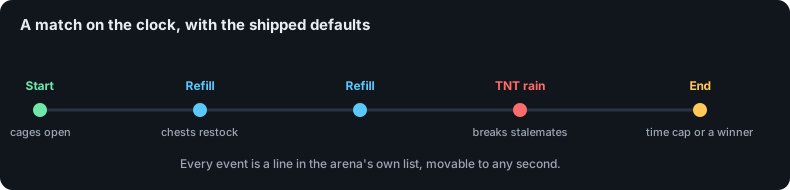
For the defaults every new arena inherits, edit `config.yml`. What ships is three refills spread
across the match and TNT rain near the end:
```yaml
Config:
Maximum-Game-Time:
Solo: 600
Teams: 600
Events:
Solo:
- REFILL@120 # [1]
- REFILL@240
- REFILL@360
- TNTRAIN@480 # [2]
Teams:
- REFILL@150
- REFILL@300
- REFILL@420
- TNTRAIN@510
```
1. Event name, an at sign, then the second of the match it fires on.
2. Events do not have to be unique. Add as many as you like, in any order.
The idea behind the shipped set is that loot keeps arriving so a long match does not go quiet,
then TNT rain forces the survivors out of hiding before the ten minute cap.
:::note
`Config.Maximum-Game-Time` sets a hard cap per mode. An event scheduled after that cap never
runs, because the match has already ended.
:::
:::warning
These are defaults for **new** arenas only. An arena stores its own event list and its own
maximum game time the first time it loads, so editing `config.yml` never changes an arena you
already built. Use the events editor for those.
:::
### The border
The border shrink only does anything if the arena has its border enabled, in the map settings
menu. How fast it closes is set by:
```yaml
Config:
Death-Match-Shrink-Factor: 2
```
Larger values shrink the border faster.
## The countdown
Before the cages open, players see a countdown as a chat message and on the action bar. Both
can be silenced if you find them noisy:
```yaml
Config:
Disable-Map-Starting-Countdown:
Message: false
Actionbar: false
```
The wording of the countdown, the boss bar, and the event names all come from the language
files. See [Messages and languages](/configuration/messages-and-languages).
## Related pages
* [Arenas and modes](/features/arenas-and-modes)
* [Chests and loot](/features/chests-and-loot)
* [Configuration](/configuration/configuration)
## Voting
While players sit in their cages they can vote on how the match runs. Open the vote menu with
the vote item in the cage hotbar.
| Vote | Options | Permission per option |
| --- | --- | --- |
| Chest tier | Basic, Normal, Epic | `asw.basic`, `asw.normal`, `asw.epic` |
| Time of day | Day, Sunset, Night | `asw.day`, `asw.sunset`, `asw.night` |
| Projectiles | Normal, Break blocks | `asw.normal-projectile`, `asw.break-projectile` |
Each option is a separate permission, so you can keep some of them for ranks. A player who
cannot vote for Epic simply does not see it as a choice.
Voting closes a few seconds before the cages open. That gap is set by
`Config.Vote-Before-Seconds`.
### What the options do
**Chest tier**
Which loot table fills the chests. See [Chests and loot](/features/chests-and-loot).
**Time of day**
Locks the arena world to that time for the match. Day, Sunset, and Night are the votable
options.
**Projectiles**
`NORMAL` is vanilla behaviour. `BREAK_BLOCKS` makes arrows destroy the block they hit, which
turns bows into a way to cut bridges and drop people into the void.
## Game events
Events fire at a set number of seconds into the match. Each arena has its own list, and new
arenas start from the defaults in `config.yml`.
| Event | Icon | What happens |
| --- | --- | --- |
| `REFILL` | Chest | Every chest in the arena is refilled from the current loot tier. |
| `TNTRAIN` | TNT | Primed TNT drops above every player still alive. |
| `BORDERSHRINK` | Spawner | The world border closes in, forcing players together into a deathmatch. |
### Setting them up
Per arena, use the events editor: `/asw map `, then the Events button. You can add,
retime, and remove events there.
For the defaults every new arena inherits, edit `config.yml`. What ships is three refills spread
across the match and TNT rain near the end:
```yaml
Config:
Maximum-Game-Time:
Solo: 600
Teams: 600
Events:
Solo:
- REFILL@120 # [1]
- REFILL@240
- REFILL@360
- TNTRAIN@480 # [2]
Teams:
- REFILL@150
- REFILL@300
- REFILL@420
- TNTRAIN@510
```
1. Event name, an at sign, then the second of the match it fires on.
2. Events do not have to be unique. Add as many as you like, in any order.
The idea behind the shipped set is that loot keeps arriving so a long match does not go quiet,
then TNT rain forces the survivors out of hiding before the ten minute cap.
:::note
`Config.Maximum-Game-Time` sets a hard cap per mode. An event scheduled after that cap never
runs, because the match has already ended.
:::
:::warning
These are defaults for **new** arenas only. An arena stores its own event list and its own
maximum game time the first time it loads, so editing `config.yml` never changes an arena you
already built. Use the events editor for those.
:::
### The border
The border shrink only does anything if the arena has its border enabled, in the map settings
menu. How fast it closes is set by:
```yaml
Config:
Death-Match-Shrink-Factor: 2
```
Larger values shrink the border faster.
## The countdown
Before the cages open, players see a countdown as a chat message and on the action bar. Both
can be silenced if you find them noisy:
```yaml
Config:
Disable-Map-Starting-Countdown:
Message: false
Actionbar: false
```
The wording of the countdown, the boss bar, and the event names all come from the language
files. See [Messages and languages](/configuration/messages-and-languages).
## Related pages
* [Arenas and modes](/features/arenas-and-modes)
* [Chests and loot](/features/chests-and-loot)
* [Configuration](/configuration/configuration)