> **Can't find what you're looking for?** Use `search_docs` on the docs MCP server at `https://aetherskywarswiki.netlify.app/api/mcp` to find what you need.
# Kits
Give players a starting inventory they choose in the cage, free or paid.
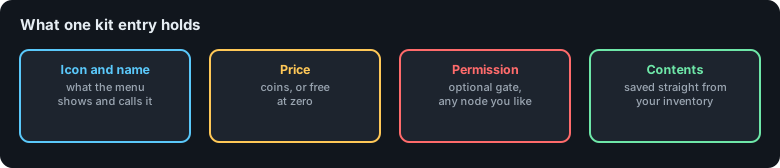 A kit is a fixed set of items handed out when the cages open. Players pick one from the kit
menu while they wait. If they pick nothing, they drop with an empty inventory.
## Picking a kit
Players open the kit menu with `/asw kits`, or with the kit item in their cage hotbar. The
menu shows every kit they are allowed to see, its price, and its contents.
A kit shows up for a player when both of these are true:
* They have the kit's permission node.
* They have bought it, or it costs nothing.
Bought kits are remembered across matches by default. Set
`Config.Shops.Only-Buy-Kits-Per-Match` to `true` if you would rather players re-buy each
match.
## Editing kits
Kits live in `plugins/AetherSkyWars/kits.yml`.
```yaml
Kits:
Ecologist: # [1]
Display-Name: Ecologist # [2]
Price: 10.0 # [3]
Icon: OAK_SAPLING # [4]
Permission: AetherSkyWars.Kit # [5]
Contents: # [6]
- AMOUNT: 8
SLOT: 0
MATERIAL: STRIPPED_OAK_WOOD
- AMOUNT: 1
SLOT: 1
MATERIAL: IRON_AXE
```
1. The internal name. Used by commands, never shown to players.
2. What players see. Colour codes work here, see [Colors](/configuration/colors).
3. Cost in coins. `0.0` makes it free.
4. The item shown in the kit menu.
5. The permission a player needs to see and use it. Several kits can share one node.
6. The items. `SLOT` is the inventory slot, counting from 0.
See [Items and slots](/configuration/items-and-slots) for every key an item
entry accepts, including lore, enchantments, custom model data, and armour colours.
### From in game
You do not have to edit the file by hand.
| Command | What it does |
| --- | --- |
| `/asw kit CREATE [cost]` | Saves your current inventory as a new kit. |
| `/asw kit DELETE ` | Removes a kit. |
| `/asw kit SETPRICE ` | Changes the price. |
| `/asw kits` | Opens the kit menu, the same one players see. |
:::tip
The quickest way to build a kit is to give yourself the exact inventory you want,
including armour, then run `/asw kit CREATE Berserker 250`.
:::
## Bundled kits
The default `kits.yml` ships with a handful of kits so the menu is not empty on a fresh
install. They are examples. Rename them, re-price them, or delete them.
| Kit | Idea |
| --- | --- |
| Default | Wooden tools. Free, and a sensible fallback. |
| Ecologist | Wood, saplings, bone meal, and an iron axe. Build your way across. |
| Life | A totem of undying. |
| Enderman | Ender pearls and ender-themed gear. |
### The ender pearl perk
Kits that hand out ender pearls can top the player up during a match rather than giving them
all at once. The interval is in `config.yml`:
```yaml
Config:
Kits:
Ender-Pearl-Perk-Give-Interval: 120
```
That is one pearl every 120 seconds while the match runs.
## Turning the kit shop off
If you want kits handed out purely by permission, with no buying:
```yaml
Config:
Shops:
Enable-Kit-Shop: false
```
Players still pick kits, they just cannot buy them with coins.
## Related pages
* [Shop and cosmetics](/features/shop-and-cosmetics)
* [Permissions](/configuration/permissions)
* [Items and slots](/configuration/items-and-slots)
A kit is a fixed set of items handed out when the cages open. Players pick one from the kit
menu while they wait. If they pick nothing, they drop with an empty inventory.
## Picking a kit
Players open the kit menu with `/asw kits`, or with the kit item in their cage hotbar. The
menu shows every kit they are allowed to see, its price, and its contents.
A kit shows up for a player when both of these are true:
* They have the kit's permission node.
* They have bought it, or it costs nothing.
Bought kits are remembered across matches by default. Set
`Config.Shops.Only-Buy-Kits-Per-Match` to `true` if you would rather players re-buy each
match.
## Editing kits
Kits live in `plugins/AetherSkyWars/kits.yml`.
```yaml
Kits:
Ecologist: # [1]
Display-Name: Ecologist # [2]
Price: 10.0 # [3]
Icon: OAK_SAPLING # [4]
Permission: AetherSkyWars.Kit # [5]
Contents: # [6]
- AMOUNT: 8
SLOT: 0
MATERIAL: STRIPPED_OAK_WOOD
- AMOUNT: 1
SLOT: 1
MATERIAL: IRON_AXE
```
1. The internal name. Used by commands, never shown to players.
2. What players see. Colour codes work here, see [Colors](/configuration/colors).
3. Cost in coins. `0.0` makes it free.
4. The item shown in the kit menu.
5. The permission a player needs to see and use it. Several kits can share one node.
6. The items. `SLOT` is the inventory slot, counting from 0.
See [Items and slots](/configuration/items-and-slots) for every key an item
entry accepts, including lore, enchantments, custom model data, and armour colours.
### From in game
You do not have to edit the file by hand.
| Command | What it does |
| --- | --- |
| `/asw kit CREATE [cost]` | Saves your current inventory as a new kit. |
| `/asw kit DELETE ` | Removes a kit. |
| `/asw kit SETPRICE ` | Changes the price. |
| `/asw kits` | Opens the kit menu, the same one players see. |
:::tip
The quickest way to build a kit is to give yourself the exact inventory you want,
including armour, then run `/asw kit CREATE Berserker 250`.
:::
## Bundled kits
The default `kits.yml` ships with a handful of kits so the menu is not empty on a fresh
install. They are examples. Rename them, re-price them, or delete them.
| Kit | Idea |
| --- | --- |
| Default | Wooden tools. Free, and a sensible fallback. |
| Ecologist | Wood, saplings, bone meal, and an iron axe. Build your way across. |
| Life | A totem of undying. |
| Enderman | Ender pearls and ender-themed gear. |
### The ender pearl perk
Kits that hand out ender pearls can top the player up during a match rather than giving them
all at once. The interval is in `config.yml`:
```yaml
Config:
Kits:
Ender-Pearl-Perk-Give-Interval: 120
```
That is one pearl every 120 seconds while the match runs.
## Turning the kit shop off
If you want kits handed out purely by permission, with no buying:
```yaml
Config:
Shops:
Enable-Kit-Shop: false
```
Players still pick kits, they just cannot buy them with coins.
## Related pages
* [Shop and cosmetics](/features/shop-and-cosmetics)
* [Permissions](/configuration/permissions)
* [Items and slots](/configuration/items-and-slots)