> **Can't find what you're looking for?** Use `search_docs` on the docs MCP server at `https://aetherskywarswiki.netlify.app/api/mcp` to find what you need.
# Creating an arena
Step by step, from the create command to a registered arena players can join.
 Set the lobby first. Stand where players should land when they leave a match and run
`/asw setlobby`. Without a lobby, players have nowhere to return to.
:::tip
`/asw help setup` lists every command on this page, in this order, so you can work
through it in game without switching back and forth.
:::
## Pick the world type
Decide this before you type anything, because it cannot be changed later and it changes every
step below.
| | `default` | `schematic` |
| --- | --- | --- |
| You want to | Build the map in game, by hand | Reuse a map you built elsewhere, or ship the same one on several servers |
| Prepare first | Nothing | Put the schematic file in `plugins/AetherSkyWars/maps` |
| The plugin gives you | An empty void world with a single bedrock block | A void world with your schematic already pasted |
| A match reset | Puts the whole saved world folder back | Clears the boundary selection and pastes the schematic again |
Full comparison on [Arenas and modes](/features/arenas-and-modes#world-types).
## Create the map
```text
/asw create # [1]
/asw create # [2]
```
1. Solo arena. One player per island.
2. Teams arena. The same island count, with more players sharing each one.
`` means the same thing in both forms: how many islands the map has, which is how many
cages you place. Count the islands on the map and use that number.
`` is either `default` or `schematic`, and it decides what `` has to be.
| World type | What to pass as `` |
| --- | --- |
| `default` | The arena name you want, such as `Volcano` |
| `schematic` | The schematic's file name, extension and all, such as `Temple.schem`. The arena and its world are named after it with the extension removed, so this one becomes `Temple` |
```text [Examples]
/asw create Volcano default 12 # 12 islands, 12 players, 12 cages
/asw create Temple.schem schematic 8 2 # 8 islands, 2 each, 16 players, 8 cages
/asw create Temple.schem schematic 8 1 # same as leaving it off, a Solo arena
```
The total player count follows from the two numbers, so you never state it. Eight islands with
two players each is a sixteen player arena. Passing `0` or `1` as the second number is the same as
leaving it off.
:::tip
The plugin prints the split before it builds anything. Read that line rather than counting in your
head.
:::
The plugin generates the world and teleports you into it. For a schematic arena it also
pastes the schematic at the world's centre, see [Using a schematic](#using-a-schematic).
:::note
The arena name is also the world name. Keep it short, without spaces. You can set a prettier
display name later with `/asw rename `.
:::
:::warning
Leaving the extension off a `schematic` create is the most common mistake here. The plugin
looks for the file exactly as you typed it and refuses with `No found in
AetherSkyWars/maps` rather than creating an arena. Both `.schem` and the older `.schematic`
work, as long as what you type matches the file.
:::
## Set it up in world
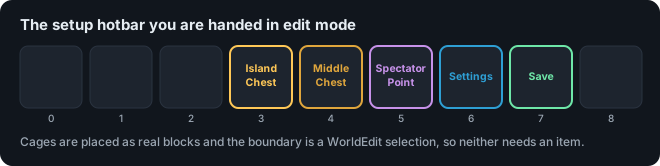
You arrive holding a setup hotbar. Each item does one job.
On a `default` arena, build the islands first. On a `schematic` arena the islands are already
there, so go straight to tagging. Everything after that is the same for both.
| Item | What to do with it |
| --- | --- |
| Cage | Stand where the cage should be and right click. The cage is placed where you are, so fly up and put it in open air. One per island, in both modes. |
| Island Chest | Right click a chest to mark it as a `NORMAL` chest. These sit on the player islands. |
| Middle Chest | Right click a chest to mark it as a `MID` chest. These sit in the centre. |
| Spectator Point | Stand where spectators should watch from and right click. Same as `/asw setspectator`. |
| Settings | Opens the map settings menu: ranked, spectating, timings, border, events. |
| Save | Writes the arena and finishes setup. Same as `/asw finish`. |
Both chest items also tag a chest you place with them held, so they work whether the map came
with chests or not.
The slot each item sits in is configurable, see
[Items and slots](/configuration/items-and-slots). The plugin matches these items by their slot,
so changing an item's material or name in `config.yml` keeps it working.
## The setup scoreboard
While you are building an arena, a scoreboard on the right shows what is still outstanding:
```text
Setting up Temple
Type: SCHEMATIC
Mode: TEAMS
Cages: 4/8 pending
Island chests: 32 done
Middle chests: 0 pending
Spectator point: pending
Boundary: pending
```
It appears when you create or edit an arena, updates as you work, and disappears once you save.
Anything reading `pending` will stop `/asw finish` from registering the arena, except the chest
counts, which are advice rather than a requirement.
The lines are in the language files under `Scoreboards.Setup`, so you can reword or reorder them.
## The rest of the setup
Set the lobby first. Stand where players should land when they leave a match and run
`/asw setlobby`. Without a lobby, players have nowhere to return to.
:::tip
`/asw help setup` lists every command on this page, in this order, so you can work
through it in game without switching back and forth.
:::
## Pick the world type
Decide this before you type anything, because it cannot be changed later and it changes every
step below.
| | `default` | `schematic` |
| --- | --- | --- |
| You want to | Build the map in game, by hand | Reuse a map you built elsewhere, or ship the same one on several servers |
| Prepare first | Nothing | Put the schematic file in `plugins/AetherSkyWars/maps` |
| The plugin gives you | An empty void world with a single bedrock block | A void world with your schematic already pasted |
| A match reset | Puts the whole saved world folder back | Clears the boundary selection and pastes the schematic again |
Full comparison on [Arenas and modes](/features/arenas-and-modes#world-types).
## Create the map
```text
/asw create # [1]
/asw create # [2]
```
1. Solo arena. One player per island.
2. Teams arena. The same island count, with more players sharing each one.
`` means the same thing in both forms: how many islands the map has, which is how many
cages you place. Count the islands on the map and use that number.
`` is either `default` or `schematic`, and it decides what `` has to be.
| World type | What to pass as `` |
| --- | --- |
| `default` | The arena name you want, such as `Volcano` |
| `schematic` | The schematic's file name, extension and all, such as `Temple.schem`. The arena and its world are named after it with the extension removed, so this one becomes `Temple` |
```text [Examples]
/asw create Volcano default 12 # 12 islands, 12 players, 12 cages
/asw create Temple.schem schematic 8 2 # 8 islands, 2 each, 16 players, 8 cages
/asw create Temple.schem schematic 8 1 # same as leaving it off, a Solo arena
```
The total player count follows from the two numbers, so you never state it. Eight islands with
two players each is a sixteen player arena. Passing `0` or `1` as the second number is the same as
leaving it off.
:::tip
The plugin prints the split before it builds anything. Read that line rather than counting in your
head.
:::
The plugin generates the world and teleports you into it. For a schematic arena it also
pastes the schematic at the world's centre, see [Using a schematic](#using-a-schematic).
:::note
The arena name is also the world name. Keep it short, without spaces. You can set a prettier
display name later with `/asw rename `.
:::
:::warning
Leaving the extension off a `schematic` create is the most common mistake here. The plugin
looks for the file exactly as you typed it and refuses with `No found in
AetherSkyWars/maps` rather than creating an arena. Both `.schem` and the older `.schematic`
work, as long as what you type matches the file.
:::
## Set it up in world
You arrive holding a setup hotbar. Each item does one job.
On a `default` arena, build the islands first. On a `schematic` arena the islands are already
there, so go straight to tagging. Everything after that is the same for both.
| Item | What to do with it |
| --- | --- |
| Cage | Stand where the cage should be and right click. The cage is placed where you are, so fly up and put it in open air. One per island, in both modes. |
| Island Chest | Right click a chest to mark it as a `NORMAL` chest. These sit on the player islands. |
| Middle Chest | Right click a chest to mark it as a `MID` chest. These sit in the centre. |
| Spectator Point | Stand where spectators should watch from and right click. Same as `/asw setspectator`. |
| Settings | Opens the map settings menu: ranked, spectating, timings, border, events. |
| Save | Writes the arena and finishes setup. Same as `/asw finish`. |
Both chest items also tag a chest you place with them held, so they work whether the map came
with chests or not.
The slot each item sits in is configurable, see
[Items and slots](/configuration/items-and-slots). The plugin matches these items by their slot,
so changing an item's material or name in `config.yml` keeps it working.
## The setup scoreboard
While you are building an arena, a scoreboard on the right shows what is still outstanding:
```text
Setting up Temple
Type: SCHEMATIC
Mode: TEAMS
Cages: 4/8 pending
Island chests: 32 done
Middle chests: 0 pending
Spectator point: pending
Boundary: pending
```
It appears when you create or edit an arena, updates as you work, and disappears once you save.
Anything reading `pending` will stop `/asw finish` from registering the arena, except the chest
counts, which are advice rather than a requirement.
The lines are in the language files under `Scoreboards.Setup`, so you can reword or reorder them.
## The rest of the setup
 ::::steps
##### Place the chests
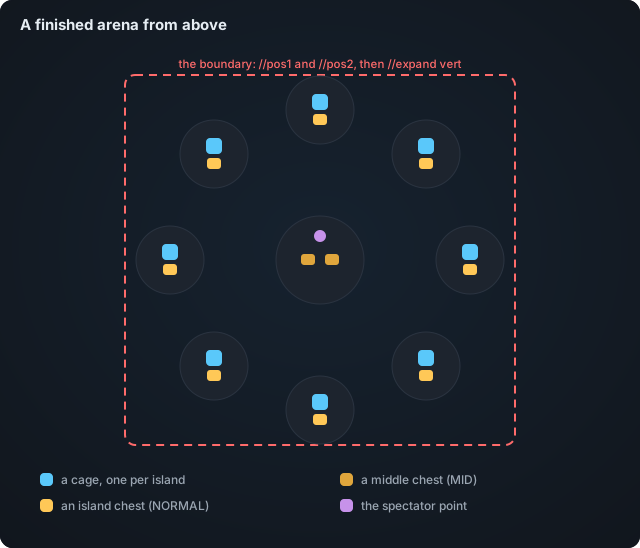
Put down real chests where you want loot, or use the ones the map came with, then tag each one
by right clicking it with the Island Chest or Middle Chest item.
Chests that came with a schematic are tagged as island chests automatically, so usually you only
have to mark the centre ones. Anything still untagged when you save is picked up as an island
chest as well.
##### Place the cages
Fly to where a cage should be, in open air, and right click with the cage item. The cage is
placed at the block you are standing in.
One cage per island, in both modes, so the count is exactly the number you gave the create
command.
:::warning
A cage is a sealed box built around that spot when the match starts, so it overwrites whatever is
there. Place it on the island floor and the floor block under it, plus the ring around it, are
replaced and then left as air when the cage opens. The arena reset puts them back, but only if
the cage is inside the boundary selection. The plugin warns you when the spot is not clear.
:::
##### Set the spectator point
Stand where dead players and spectators should watch from, then right click with the Spectator
Point item, or run `/asw setspectator`.
This one is easy to miss and `/asw finish` refuses without it.
##### Set the boundaries
Select the whole arena with WorldEdit: `//pos1` and `//pos2`, or the WorldEdit axe.
:::info
Run `//expand vert` after selecting. The selection has to cover the full height of the arena,
otherwise the border and the reset will only cover part of it.
:::
This step matters more on a `schematic` arena. The selection is what gets set to air before the
schematic is pasted again, so anything outside it is never cleaned up and carries over into the
next match. On a `default` arena the reset puts the whole world folder back either way, and the
selection only sets the border and the arena bounds.
##### Check the settings
Open the settings item, or `/asw map `, and set the timings, ranked flag, and events.
See [Arenas and modes](/features/arenas-and-modes).
##### Finish
Run `/asw finish`, or click the save item. The arena is registered and appears in the maps
menu.
On a `default` arena this is also the moment the world is saved. The plugin copies the whole
world folder into `plugins/AetherSkyWars/maps`, and that copy is what every reset restores. A
`schematic` arena has nothing to copy, since your schematic file already is the saved state.
::::
## Using a schematic
To build the arena somewhere else and paste it in:
1. Build the arena on any world you like.
2. Select it with WorldEdit, then `//copy`.
3. `//schem save `. Use the name you want the arena to have.
4. Copy the resulting `.schem` file from WorldEdit's schematics folder into
`plugins/AetherSkyWars/maps`.
5. Run `/asw create .schem schematic ...`, with the extension. The plugin pastes the
schematic into a fresh void world and names the arena after the file without its extension.
6. Carry on from [The rest of the setup](#the-rest-of-the-setup). Cages and chests still have
to be tagged in game.
:::tip
`//copy` records positions relative to where you stand. Stand in a consistent spot, like
the centre of the map, so the paste lands where you expect.
:::
### Old .schematic files
Both file formats work, but they do not carry the same information. The newer `.schem` stores
the full state of every block. The older `.schematic` stores a block id and four bits of data,
which was never enough room for the things the server used to work out from a block's
neighbours. Paste one and you get a map where every fence stands as a lone post, glass panes
and iron bars do not join up, walls have no posts, staircase corners are squared off, fence
gates ignore the walls beside them, and every double chest has split into two singles.
There is no WorldEdit or FastAsyncWorldEdit command that repairs this, so AetherSkyWars does it
itself. Pasting a `.schematic` arena starts a pass over the area that puts all of those back,
spread across ticks so the server keeps running, and tells you how many blocks it changed. The
same pass runs again on every reset, since a reset pastes the file again. A `.schem` arena is
never touched, because there is nothing to repair.
Run it by hand on an arena that already exists with:
```
/asw fixconnect
```
It works on any arena with a boundary set, so you can also use it after editing a `default`
arena with a tool that left connections behind.
To switch it off, set `Fix-Legacy-Schematic-Connections` to `false` in `config.yml`.
:::tip
Redstone wire is left alone. Whether wire connects depends on what the blocks around it do
with a signal, which the pass cannot see, so a guess there would be worse than leaving it.
:::
### Changing a schematic arena later
The schematic file is the arena. Anything you build in the arena world by hand disappears at
the next reset, because the reset clears the boundary and pastes the file again.
To change the map, edit it where you originally built it, `//schem save` over the same file
name, copy it into `plugins/AetherSkyWars/maps` again, then run `/asw reset `. Cages,
chests, and the boundary are stored with the arena, not in the schematic, so they survive.
A `default` arena works the other way round. Use `/asw editmap `, change the world, then
`/asw finish` to write a fresh copy over the saved one.
## Editing an arena later
| Command | What it does |
| --- | --- |
| `/asw editmap ` | Takes the arena offline and hands you the setup hotbar again. |
| `/asw map ` | Opens the settings menu without taking the arena offline. |
| `/asw tp ` | Teleports you into the arena world. |
| `/asw rename ` | Changes the name players see. The internal name stays. |
| `/asw duplicate ` | Copies an arena, world and all, under a new name. |
| `/asw reset ` | Forces a world reset. |
| `/asw unregister ` | Hides the arena from players without deleting it. |
| `/asw delete ` | Deletes the arena and its world. There is no undo. |
:::warning
`/asw delete` removes the arena world from disk. Take a copy of the world folder first if you
are not certain.
:::
## Checklist
Before you tell players an arena is ready:
* Cages placed, one per island
* Chests tagged as tier 1 or tier 2
* Spectator location set with `/asw setspectator`
* Boundaries selected and expanded vertically
* Settings and events reviewed
* `/asw finish` run, and the arena shows as `AVAILABLE`
* Joined it yourself once, start to finish
Something not behaving? Check [FAQ](/help/faq), then ask on
[Discord](https://discord.arrowtan.cc).
::::steps
##### Place the chests
Put down real chests where you want loot, or use the ones the map came with, then tag each one
by right clicking it with the Island Chest or Middle Chest item.
Chests that came with a schematic are tagged as island chests automatically, so usually you only
have to mark the centre ones. Anything still untagged when you save is picked up as an island
chest as well.
##### Place the cages
Fly to where a cage should be, in open air, and right click with the cage item. The cage is
placed at the block you are standing in.
One cage per island, in both modes, so the count is exactly the number you gave the create
command.
:::warning
A cage is a sealed box built around that spot when the match starts, so it overwrites whatever is
there. Place it on the island floor and the floor block under it, plus the ring around it, are
replaced and then left as air when the cage opens. The arena reset puts them back, but only if
the cage is inside the boundary selection. The plugin warns you when the spot is not clear.
:::
##### Set the spectator point
Stand where dead players and spectators should watch from, then right click with the Spectator
Point item, or run `/asw setspectator`.
This one is easy to miss and `/asw finish` refuses without it.
##### Set the boundaries
Select the whole arena with WorldEdit: `//pos1` and `//pos2`, or the WorldEdit axe.
:::info
Run `//expand vert` after selecting. The selection has to cover the full height of the arena,
otherwise the border and the reset will only cover part of it.
:::
This step matters more on a `schematic` arena. The selection is what gets set to air before the
schematic is pasted again, so anything outside it is never cleaned up and carries over into the
next match. On a `default` arena the reset puts the whole world folder back either way, and the
selection only sets the border and the arena bounds.
##### Check the settings
Open the settings item, or `/asw map `, and set the timings, ranked flag, and events.
See [Arenas and modes](/features/arenas-and-modes).
##### Finish
Run `/asw finish`, or click the save item. The arena is registered and appears in the maps
menu.
On a `default` arena this is also the moment the world is saved. The plugin copies the whole
world folder into `plugins/AetherSkyWars/maps`, and that copy is what every reset restores. A
`schematic` arena has nothing to copy, since your schematic file already is the saved state.
::::
## Using a schematic
To build the arena somewhere else and paste it in:
1. Build the arena on any world you like.
2. Select it with WorldEdit, then `//copy`.
3. `//schem save `. Use the name you want the arena to have.
4. Copy the resulting `.schem` file from WorldEdit's schematics folder into
`plugins/AetherSkyWars/maps`.
5. Run `/asw create .schem schematic ...`, with the extension. The plugin pastes the
schematic into a fresh void world and names the arena after the file without its extension.
6. Carry on from [The rest of the setup](#the-rest-of-the-setup). Cages and chests still have
to be tagged in game.
:::tip
`//copy` records positions relative to where you stand. Stand in a consistent spot, like
the centre of the map, so the paste lands where you expect.
:::
### Old .schematic files
Both file formats work, but they do not carry the same information. The newer `.schem` stores
the full state of every block. The older `.schematic` stores a block id and four bits of data,
which was never enough room for the things the server used to work out from a block's
neighbours. Paste one and you get a map where every fence stands as a lone post, glass panes
and iron bars do not join up, walls have no posts, staircase corners are squared off, fence
gates ignore the walls beside them, and every double chest has split into two singles.
There is no WorldEdit or FastAsyncWorldEdit command that repairs this, so AetherSkyWars does it
itself. Pasting a `.schematic` arena starts a pass over the area that puts all of those back,
spread across ticks so the server keeps running, and tells you how many blocks it changed. The
same pass runs again on every reset, since a reset pastes the file again. A `.schem` arena is
never touched, because there is nothing to repair.
Run it by hand on an arena that already exists with:
```
/asw fixconnect
```
It works on any arena with a boundary set, so you can also use it after editing a `default`
arena with a tool that left connections behind.
To switch it off, set `Fix-Legacy-Schematic-Connections` to `false` in `config.yml`.
:::tip
Redstone wire is left alone. Whether wire connects depends on what the blocks around it do
with a signal, which the pass cannot see, so a guess there would be worse than leaving it.
:::
### Changing a schematic arena later
The schematic file is the arena. Anything you build in the arena world by hand disappears at
the next reset, because the reset clears the boundary and pastes the file again.
To change the map, edit it where you originally built it, `//schem save` over the same file
name, copy it into `plugins/AetherSkyWars/maps` again, then run `/asw reset `. Cages,
chests, and the boundary are stored with the arena, not in the schematic, so they survive.
A `default` arena works the other way round. Use `/asw editmap `, change the world, then
`/asw finish` to write a fresh copy over the saved one.
## Editing an arena later
| Command | What it does |
| --- | --- |
| `/asw editmap ` | Takes the arena offline and hands you the setup hotbar again. |
| `/asw map ` | Opens the settings menu without taking the arena offline. |
| `/asw tp ` | Teleports you into the arena world. |
| `/asw rename ` | Changes the name players see. The internal name stays. |
| `/asw duplicate ` | Copies an arena, world and all, under a new name. |
| `/asw reset ` | Forces a world reset. |
| `/asw unregister ` | Hides the arena from players without deleting it. |
| `/asw delete ` | Deletes the arena and its world. There is no undo. |
:::warning
`/asw delete` removes the arena world from disk. Take a copy of the world folder first if you
are not certain.
:::
## Checklist
Before you tell players an arena is ready:
* Cages placed, one per island
* Chests tagged as tier 1 or tier 2
* Spectator location set with `/asw setspectator`
* Boundaries selected and expanded vertically
* Settings and events reviewed
* `/asw finish` run, and the arena shows as `AVAILABLE`
* Joined it yourself once, start to finish
Something not behaving? Check [FAQ](/help/faq), then ask on
[Discord](https://discord.arrowtan.cc).