> **Can't find what you're looking for?** Use `search_docs` on the docs MCP server at `https://aetherskywarswiki.netlify.app/api/mcp` to find what you need.
# Chests and loot
Three loot tiers, two chest types, and full control over what comes out of them.
 ## The two chest kinds
When you tag a chest during arena setup you pick one of two kinds. The setup hotbar names them
after where they go.
| Setup item | Kind | Usual placement |
| --- | --- | --- |
| Island Chest | `NORMAL` | The chests on each player island. First thing anyone opens. |
| Middle Chest | `MID` | The chests in the centre of the map. Worth fighting over. |
Chests that arrive with a schematic are tagged as island chests automatically, and so is anything
still untagged when you finish setup. In practice you only mark the centre ones by hand.
## The three loot tiers
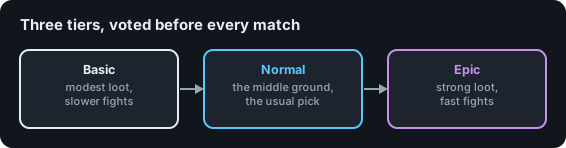
Every match runs on one tier. Players vote for it while they sit in the cage, and the arena
falls back to a default if nobody votes.
| Tier | File | Feel |
| --- | --- | --- |
| Basic | `tiers/basic.yml` | Wood, stone, food, a few buckets. Long, scrappy games. |
| Normal | `tiers/normal.yml` | Iron, some enchanted gear, decent food. The middle ground. |
| Epic | `tiers/epic.yml` | Diamond gear, strong enchants, golden apples. Fast and violent. |
Each tier is a separate file in `plugins/AetherSkyWars/tiers/`. Editing one does not touch the others.
## How the two fit together
The kind and the tier are different axes, and every chest uses both.
Each tier file holds two lists: `Items` for island chests and `Mid-Items` for middle chests. Three
tiers with two lists each is six loot tables in total.
* The **vote** picks the tier for the whole match, so every chest in the arena moves together.
* The **tag** picks which of that tier's two lists a chest draws from, and never changes.
So a middle chest is not simply a chest in a nicer spot. On the Epic tier it rolls from
`tiers/epic.yml` under `Mid-Items`, while an island chest a few blocks away rolls from the same file under
`Items`. Open the pair you want with `/asw seetier `.
One name collision worth knowing: `NORMAL` is both a chest kind and a tier name. They are
unrelated. An island chest in an Epic match is a `NORMAL` chest on the Epic tier.
:::tip
Voting for a tier needs a permission, so you can keep Epic for ranks.
See [Permissions](/configuration/permissions).
:::
## How a chest is filled
When a chest is first opened, the plugin rolls its contents:
1. It reads the loot table for the tier the match is running.
2. It walks the item list and rolls each item's `Chance` out of 100.
3. It stops once the chest holds `Max-Items-Per-Chest` items.
4. If `Shuffle-Items-In-Chest` is on, the items land in random slots instead of in order.
So `Chance` is a per item roll, not a share of a total. Two items at chance 50 do not mean
one or the other, they mean each has its own coin flip.
:::note
Because the fill stops at the maximum item count, items near the top of the list get picked
more often than items near the bottom. Put the things you want players to see first at the
top.
:::
## Editing a loot table
Each file has a maximum item count and a list of entries.
```yaml
Max-Items-Per-Chest: 7 # [1]
Items:
- Chance: 60 # [2]
Item: # [3]
AMOUNT: 1
MATERIAL: WATER_BUCKET
- Chance: 40
Item:
AMOUNT: 1
MATERIAL: IRON_SWORD
ENCHANTMENTS: sharpness:1 # [4]
```
1. How many items a single chest can hold at most.
2. Chance out of 100 that this entry is rolled in.
3. The item itself, in the plugin's item format. See
[Items and slots](/configuration/items-and-slots) for every supported key.
4. Enchantments use the Minecraft id and a level, separated by a colon, several separated by
semicolons.
### Editing from in game instead
You do not have to touch the files.
| Command | What it does |
| --- | --- |
| `/asw seetier ` | Opens the loot table for that tier as a menu you can browse. |
| `/asw set2chest ` | Writes your current inventory into that loot table. |
| `/asw item2config` | Prints the item you are holding in config format, ready to paste. |
`` is `BASIC`, `NORMAL`, or `EPIC`. `` is `NORMAL` or `MID`.
Clicking an item inside the tier viewer lets you change its drop chance.
:::tip
The fastest way to build a tier: kit yourself out with exactly what you want in a chest, then
run `/asw set2chest EPIC MID`. Adjust the chances afterwards in the viewer.
:::
## Refills
Chests can refill during a match, so players have a reason to come back to the middle.
Refills are game events. Add them per arena in the events editor, or set the defaults in
`config.yml`:
```yaml
Config:
Default-Refill-Time: 180
Events:
Solo:
- REFILL@120
- REFILL@240
- REFILL@360
- TNTRAIN@480
Teams:
- REFILL@150
- REFILL@300
- REFILL@420
- TNTRAIN@510
```
`REFILL@60` means a refill 60 seconds into the match. See
[Voting and game events](/features/voting-and-events) for the full event list.
## Chest animation
Chests play the vanilla open and close animation when a player uses them. If that causes
problems on your setup, turn it off:
```yaml
Config:
Disable-Chest-Animation: true
```
## Related pages
* [Creating an arena](/features/creating-an-arena)
* [Voting and game events](/features/voting-and-events)
* [Items and slots](/configuration/items-and-slots)
## The two chest kinds
When you tag a chest during arena setup you pick one of two kinds. The setup hotbar names them
after where they go.
| Setup item | Kind | Usual placement |
| --- | --- | --- |
| Island Chest | `NORMAL` | The chests on each player island. First thing anyone opens. |
| Middle Chest | `MID` | The chests in the centre of the map. Worth fighting over. |
Chests that arrive with a schematic are tagged as island chests automatically, and so is anything
still untagged when you finish setup. In practice you only mark the centre ones by hand.
## The three loot tiers
Every match runs on one tier. Players vote for it while they sit in the cage, and the arena
falls back to a default if nobody votes.
| Tier | File | Feel |
| --- | --- | --- |
| Basic | `tiers/basic.yml` | Wood, stone, food, a few buckets. Long, scrappy games. |
| Normal | `tiers/normal.yml` | Iron, some enchanted gear, decent food. The middle ground. |
| Epic | `tiers/epic.yml` | Diamond gear, strong enchants, golden apples. Fast and violent. |
Each tier is a separate file in `plugins/AetherSkyWars/tiers/`. Editing one does not touch the others.
## How the two fit together
The kind and the tier are different axes, and every chest uses both.
Each tier file holds two lists: `Items` for island chests and `Mid-Items` for middle chests. Three
tiers with two lists each is six loot tables in total.
* The **vote** picks the tier for the whole match, so every chest in the arena moves together.
* The **tag** picks which of that tier's two lists a chest draws from, and never changes.
So a middle chest is not simply a chest in a nicer spot. On the Epic tier it rolls from
`tiers/epic.yml` under `Mid-Items`, while an island chest a few blocks away rolls from the same file under
`Items`. Open the pair you want with `/asw seetier `.
One name collision worth knowing: `NORMAL` is both a chest kind and a tier name. They are
unrelated. An island chest in an Epic match is a `NORMAL` chest on the Epic tier.
:::tip
Voting for a tier needs a permission, so you can keep Epic for ranks.
See [Permissions](/configuration/permissions).
:::
## How a chest is filled
When a chest is first opened, the plugin rolls its contents:
1. It reads the loot table for the tier the match is running.
2. It walks the item list and rolls each item's `Chance` out of 100.
3. It stops once the chest holds `Max-Items-Per-Chest` items.
4. If `Shuffle-Items-In-Chest` is on, the items land in random slots instead of in order.
So `Chance` is a per item roll, not a share of a total. Two items at chance 50 do not mean
one or the other, they mean each has its own coin flip.
:::note
Because the fill stops at the maximum item count, items near the top of the list get picked
more often than items near the bottom. Put the things you want players to see first at the
top.
:::
## Editing a loot table
Each file has a maximum item count and a list of entries.
```yaml
Max-Items-Per-Chest: 7 # [1]
Items:
- Chance: 60 # [2]
Item: # [3]
AMOUNT: 1
MATERIAL: WATER_BUCKET
- Chance: 40
Item:
AMOUNT: 1
MATERIAL: IRON_SWORD
ENCHANTMENTS: sharpness:1 # [4]
```
1. How many items a single chest can hold at most.
2. Chance out of 100 that this entry is rolled in.
3. The item itself, in the plugin's item format. See
[Items and slots](/configuration/items-and-slots) for every supported key.
4. Enchantments use the Minecraft id and a level, separated by a colon, several separated by
semicolons.
### Editing from in game instead
You do not have to touch the files.
| Command | What it does |
| --- | --- |
| `/asw seetier ` | Opens the loot table for that tier as a menu you can browse. |
| `/asw set2chest ` | Writes your current inventory into that loot table. |
| `/asw item2config` | Prints the item you are holding in config format, ready to paste. |
`` is `BASIC`, `NORMAL`, or `EPIC`. `` is `NORMAL` or `MID`.
Clicking an item inside the tier viewer lets you change its drop chance.
:::tip
The fastest way to build a tier: kit yourself out with exactly what you want in a chest, then
run `/asw set2chest EPIC MID`. Adjust the chances afterwards in the viewer.
:::
## Refills
Chests can refill during a match, so players have a reason to come back to the middle.
Refills are game events. Add them per arena in the events editor, or set the defaults in
`config.yml`:
```yaml
Config:
Default-Refill-Time: 180
Events:
Solo:
- REFILL@120
- REFILL@240
- REFILL@360
- TNTRAIN@480
Teams:
- REFILL@150
- REFILL@300
- REFILL@420
- TNTRAIN@510
```
`REFILL@60` means a refill 60 seconds into the match. See
[Voting and game events](/features/voting-and-events) for the full event list.
## Chest animation
Chests play the vanilla open and close animation when a player uses them. If that causes
problems on your setup, turn it off:
```yaml
Config:
Disable-Chest-Animation: true
```
## Related pages
* [Creating an arena](/features/creating-an-arena)
* [Voting and game events](/features/voting-and-events)
* [Items and slots](/configuration/items-and-slots)