> **Can't find what you're looking for?** Use `search_docs` on the docs MCP server at `https://aetherskywarswiki.netlify.app/api/mcp` to find what you need.
# Arenas and modes
The two game modes, the two world types, and what an arena is doing at any moment.
 ## Modes
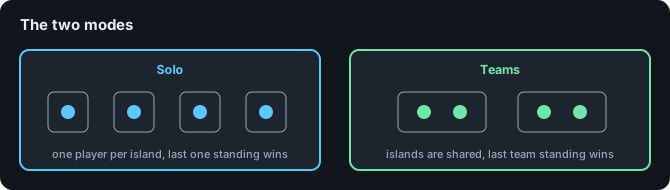
An arena is either Solo or Teams. You pick this once, when you create the map, and it cannot
be changed afterwards.
| Mode | How it works |
| --- | --- |
| Solo | One player per island and cage. Last player alive wins. You choose how many islands the map has. |
| Teams | Several players share an island, a cage, and a team colour. Last team alive wins. You choose how many islands the map has and how many players sit on each, so 8 islands of 2 holds 16 players. |
Team mates cannot damage each other, and they keep their spawn invincibility together at the
start of a match.
### Ranked arenas
Any arena can be flagged as **ranked** from the map settings menu. Ranked arenas write to a
separate set of stats and leaderboards, so a casual win and a ranked win are counted apart.
Nothing else about the match changes.
:::tip
Ranked and casual are separate leaderboard categories. See
[Achievements and leaderboards](/features/achievements-and-leaderboards).
:::
#### Turning ranked off entirely
If you never want ranked on your server, set this in `config.yml`:
```yaml
Config:
Enable-Ranked-System: false
```
Every arena then plays as unranked whatever it is marked as, no ranked statistic is written, the
RANKED tag stops appearing on the arena icon and in the actionbar, the arena list drops its two
ranked filters, and the Ranked toggle disappears from an arena's settings and its dashboard.
Which arenas you had marked is not cleared. Turn it back on and they are ranked again exactly as
they were. Ranked statistics already recorded are left alone either way, so the ranked
placeholders and leaderboards keep reading what they read before.
## World types
Every arena lives in its own world. You choose how that world is built when you create the map,
and like the mode, you cannot change it afterwards.
| Type | What happens |
| --- | --- |
| `DEFAULT` | The plugin generates an empty void world and you build the islands yourself, in game. Good for a one-off arena you want to design by hand. |
| `SCHEMATIC` | The plugin generates a void world, then pastes a schematic you supply. Good for reusing a map you built elsewhere, or for shipping the same arena on several servers. |
The choice runs deeper than how the world starts. It decides what you type in the create
command, where the arena is stored, how it resets after a match, and how you change it later.
| | `default` | `schematic` |
| --- | --- | --- |
| Before you start | Nothing. The world is made for you | The schematic file has to be in `plugins/AetherSkyWars/maps` already |
| What you name in the create command | The arena name, such as `Volcano` | The file name including its extension, such as `Volcano.schem`. The arena name is that with the extension removed |
| Where the map is built | In game, in the arena world | Anywhere you like, then copied in as a file |
| What is stored | A copy of the whole world folder, written into `plugins/AetherSkyWars/maps` when you finish setup | Just your schematic file. Nothing is copied |
| How a match resets it | The live world is deleted and the saved copy is put back | Everything inside the boundary selection is set to air, then the schematic is pasted again |
| What the boundary selection controls | The world border and the arena bounds | The same, and also exactly which blocks get cleared on reset |
| Changing the map later | `/asw editmap`, build the change, `/asw finish`. The saved copy is rewritten | Edit the schematic where you built it, save over the file in `maps`, then reset the arena |
| Disk cost per arena | A full world folder | One schematic file |
Two consequences worth knowing before you pick:
* On a `schematic` arena, blocks placed outside the boundary selection are never cleared, so
they survive every reset and pile up. On a `default` arena the whole world comes back
regardless, because the reset replaces the folder.
* On a `schematic` arena, anything you build in the world by hand is gone at the next reset.
The schematic file is the arena, not the world.
See [Creating an arena](/features/creating-an-arena) for the full walkthrough of either route.
:::note
Arena worlds are managed by AetherSkyWars, not by your world manager. If you run
Multiverse-Core or My\_Worlds, leave the arena worlds alone in those plugins and let
AetherSkyWars load, reset, and unload them.
:::
## Arena states
An arena moves through these states. The state is shown on join signs, in the maps menu, and
in the arena list.
| State | Meaning |
| --- | --- |
| `AVAILABLE` | Empty and ready. Players can join. |
| `WAITING` | Has players, but not enough to start the countdown yet. |
| `STARTING` | Enough players joined. The countdown is running and players are in their cages. |
| `PLAYING` | The cages have opened. The match is live. |
| `FINISHING` | Someone won. The end-of-game timer is running before the reset. |
| `RESETTING` | The world is being restored. Players cannot join until this finishes. |
An arena that has not been fully set up yet is **unregistered**. It does not appear to players
and cannot be joined. Finishing the setup with `/asw finish` registers it.
## Match flow
1. Players join, through the maps menu, a join sign, a pressure plate, or `/asw play SOLO`.
2. Each player is put in a cage. They can pick a kit and vote while they wait.
3. Once the minimum player count is reached, the start countdown runs.
4. The cages open. Everyone gets a few seconds of invincibility, then the match is live.
5. Timed events fire during the match: chest refills, TNT rain, or the border shrink.
6. Someone wins. The winner gets a firework and a coin payout, and the arena enters the
end-of-game timer.
7. The world resets and the arena becomes available again.
Per-arena timings (start countdown, invincibility, maximum game time, end-of-game time) are
set in the map settings menu and default to the values in
[config.yml](/configuration/configuration).
## Per-arena settings
Open these with `/asw map ` or the settings button while editing a map.
| Setting | What it does |
| --- | --- |
| Ranked | Marks the arena as ranked, writing to the ranked stats and leaderboards. |
| Spectator | Whether a player who dies stays as a spectator or is sent to the lobby. |
| Instant Ending | Ends and resets the arena the moment someone wins, skipping the end timer. |
| Border | Whether the world border shrinks during the match. |
| Start Game Time | Seconds of countdown before the cages open. |
| End Game Time | Seconds the arena stays up after someone wins. |
| Max Game Time | Seconds before the match is forced to end. |
| Invincibility Seconds | Seconds of protection after the cages open. |
| Events | Opens the event editor. See [Voting and game events](/features/voting-and-events). |
## Related pages
* [Creating an arena](/features/creating-an-arena)
* [Chests and loot](/features/chests-and-loot)
* [Signs and holograms](/features/signs-and-holograms)
* [Commands](/reference/commands)
## Modes
An arena is either Solo or Teams. You pick this once, when you create the map, and it cannot
be changed afterwards.
| Mode | How it works |
| --- | --- |
| Solo | One player per island and cage. Last player alive wins. You choose how many islands the map has. |
| Teams | Several players share an island, a cage, and a team colour. Last team alive wins. You choose how many islands the map has and how many players sit on each, so 8 islands of 2 holds 16 players. |
Team mates cannot damage each other, and they keep their spawn invincibility together at the
start of a match.
### Ranked arenas
Any arena can be flagged as **ranked** from the map settings menu. Ranked arenas write to a
separate set of stats and leaderboards, so a casual win and a ranked win are counted apart.
Nothing else about the match changes.
:::tip
Ranked and casual are separate leaderboard categories. See
[Achievements and leaderboards](/features/achievements-and-leaderboards).
:::
#### Turning ranked off entirely
If you never want ranked on your server, set this in `config.yml`:
```yaml
Config:
Enable-Ranked-System: false
```
Every arena then plays as unranked whatever it is marked as, no ranked statistic is written, the
RANKED tag stops appearing on the arena icon and in the actionbar, the arena list drops its two
ranked filters, and the Ranked toggle disappears from an arena's settings and its dashboard.
Which arenas you had marked is not cleared. Turn it back on and they are ranked again exactly as
they were. Ranked statistics already recorded are left alone either way, so the ranked
placeholders and leaderboards keep reading what they read before.
## World types
Every arena lives in its own world. You choose how that world is built when you create the map,
and like the mode, you cannot change it afterwards.
| Type | What happens |
| --- | --- |
| `DEFAULT` | The plugin generates an empty void world and you build the islands yourself, in game. Good for a one-off arena you want to design by hand. |
| `SCHEMATIC` | The plugin generates a void world, then pastes a schematic you supply. Good for reusing a map you built elsewhere, or for shipping the same arena on several servers. |
The choice runs deeper than how the world starts. It decides what you type in the create
command, where the arena is stored, how it resets after a match, and how you change it later.
| | `default` | `schematic` |
| --- | --- | --- |
| Before you start | Nothing. The world is made for you | The schematic file has to be in `plugins/AetherSkyWars/maps` already |
| What you name in the create command | The arena name, such as `Volcano` | The file name including its extension, such as `Volcano.schem`. The arena name is that with the extension removed |
| Where the map is built | In game, in the arena world | Anywhere you like, then copied in as a file |
| What is stored | A copy of the whole world folder, written into `plugins/AetherSkyWars/maps` when you finish setup | Just your schematic file. Nothing is copied |
| How a match resets it | The live world is deleted and the saved copy is put back | Everything inside the boundary selection is set to air, then the schematic is pasted again |
| What the boundary selection controls | The world border and the arena bounds | The same, and also exactly which blocks get cleared on reset |
| Changing the map later | `/asw editmap`, build the change, `/asw finish`. The saved copy is rewritten | Edit the schematic where you built it, save over the file in `maps`, then reset the arena |
| Disk cost per arena | A full world folder | One schematic file |
Two consequences worth knowing before you pick:
* On a `schematic` arena, blocks placed outside the boundary selection are never cleared, so
they survive every reset and pile up. On a `default` arena the whole world comes back
regardless, because the reset replaces the folder.
* On a `schematic` arena, anything you build in the world by hand is gone at the next reset.
The schematic file is the arena, not the world.
See [Creating an arena](/features/creating-an-arena) for the full walkthrough of either route.
:::note
Arena worlds are managed by AetherSkyWars, not by your world manager. If you run
Multiverse-Core or My\_Worlds, leave the arena worlds alone in those plugins and let
AetherSkyWars load, reset, and unload them.
:::
## Arena states
An arena moves through these states. The state is shown on join signs, in the maps menu, and
in the arena list.
| State | Meaning |
| --- | --- |
| `AVAILABLE` | Empty and ready. Players can join. |
| `WAITING` | Has players, but not enough to start the countdown yet. |
| `STARTING` | Enough players joined. The countdown is running and players are in their cages. |
| `PLAYING` | The cages have opened. The match is live. |
| `FINISHING` | Someone won. The end-of-game timer is running before the reset. |
| `RESETTING` | The world is being restored. Players cannot join until this finishes. |
An arena that has not been fully set up yet is **unregistered**. It does not appear to players
and cannot be joined. Finishing the setup with `/asw finish` registers it.
## Match flow
1. Players join, through the maps menu, a join sign, a pressure plate, or `/asw play SOLO`.
2. Each player is put in a cage. They can pick a kit and vote while they wait.
3. Once the minimum player count is reached, the start countdown runs.
4. The cages open. Everyone gets a few seconds of invincibility, then the match is live.
5. Timed events fire during the match: chest refills, TNT rain, or the border shrink.
6. Someone wins. The winner gets a firework and a coin payout, and the arena enters the
end-of-game timer.
7. The world resets and the arena becomes available again.
Per-arena timings (start countdown, invincibility, maximum game time, end-of-game time) are
set in the map settings menu and default to the values in
[config.yml](/configuration/configuration).
## Per-arena settings
Open these with `/asw map ` or the settings button while editing a map.
| Setting | What it does |
| --- | --- |
| Ranked | Marks the arena as ranked, writing to the ranked stats and leaderboards. |
| Spectator | Whether a player who dies stays as a spectator or is sent to the lobby. |
| Instant Ending | Ends and resets the arena the moment someone wins, skipping the end timer. |
| Border | Whether the world border shrinks during the match. |
| Start Game Time | Seconds of countdown before the cages open. |
| End Game Time | Seconds the arena stays up after someone wins. |
| Max Game Time | Seconds before the match is forced to end. |
| Invincibility Seconds | Seconds of protection after the cages open. |
| Events | Opens the event editor. See [Voting and game events](/features/voting-and-events). |
## Related pages
* [Creating an arena](/features/creating-an-arena)
* [Chests and loot](/features/chests-and-loot)
* [Signs and holograms](/features/signs-and-holograms)
* [Commands](/reference/commands)