> **Can't find what you're looking for?** Use `search_docs` on the docs MCP server at `https://aetherskywarswiki.netlify.app/api/mcp` to find what you need.
# Messages and languages
Change any message, add your own language, and colour it however you like.
 ## Where text lives
| Location | What it holds |
| --- | --- |
| `plugins/AetherSkyWars/languages/` | One file per language. Almost every message players see. |
| `config.yml`, under `Config.Languages.Strings` | Shared strings: menu buttons, boss bar, event names, proxy messages. |
| `config.yml`, `Config.Prefix` | The prefix in front of plugin messages. |
Six languages ship with the plugin: `en_us`, `pt_pt`, `es_es`, `fr_fr`, `pl_pl`, `zh_cn`.
## Your wording survives updates
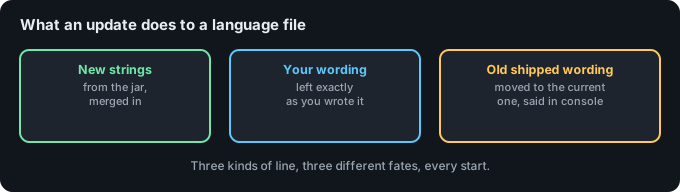
An update merges new strings into your files and leaves every line you wrote alone. There is one
deliberate exception: a line still sitting word for word on a wording an old version shipped is
moved to the current wording, so a fixed message actually reaches you. The console says how many
lines moved, per language. Anything you changed yourself matches no old wording and is never
touched.
## Choosing the default
```yaml
Config:
Languages:
Default-Language: en_us
```
Players can switch to another language themselves from the settings menu, unless you take
that away:
```yaml
Config:
Disable-Language-Selection: true
```
## Adding a language
1. Copy `languages/en_us.yml` to a new file, named after the locale, for example `de_de.yml`.
2. Translate the values. Leave the keys alone.
3. Restart, or `/asw reload`.
4. Check it loaded with `/asw verifylang`.
`/asw verifylang` compares every language file against the English one and reports keys that
are missing or left over. Run it after any translation work.
:::info
Keep the placeholders. A line like `"Time left : %time%"` needs `%time%` to survive
translation, otherwise the value has nowhere to go.
:::
## Colours
Every message goes through the same colour engine, so all of this works anywhere you can type
text: language files, kit names, shop names, sign lines, and the item names and lore in
[items.yml](/configuration/items-and-slots), including the buttons inside menus. The quick
version is below; [Colors](/configuration/colors) has the full guide, with a chart and the
complete named palette.
| Style | Syntax | Example |
| --- | --- | --- |
| Legacy codes | `&` plus a code | `&aGreen &lBold` |
| Hex | `&#RRGGBB` | `&#FF8800Orange` |
| Hex, alternative | `#{RRGGBB}` | `#{FF8800}Orange` |
| Hex, tag form | `` | `Orange` |
| Gradient | `text` | `fade` |
| Gradient, MiniMessage style | `text` | `fade` |
| Rainbow | `text` | `party` |
| Named palette | `&` plus a palette code | `&t7` for coral |
Formatting codes (`&l` bold, `&o` italic, `&n` underline, `&k` obfuscated) carry through
inside a gradient or rainbow. `&r` resets them.
### The palette the plugin ships with
The bundled messages use hex rather than the sixteen legacy colours, since 1.21 servers render
it everywhere. The accents follow one palette, so a message reads as part of the same plugin
wherever it appears.
| Meaning | Hex | Used for |
| --- | --- | --- |
| Brand | `#5AC8FA` | The plugin's own name, arena names, values worth reading |
| Brand, deeper | `#2E9FD4` | The far end of the prefix gradient |
| Success | `#6EE7A8` | Something worked, a win, a step completed |
| Danger | `#FF6B6B` | Something failed, or is about to be destroyed |
| Attention | `#FFC857` | Warnings, and anything still outstanding |
| Accent | `#C792EA` | Achievements and cosmetics |
| Body | `#E6EDF3` | Ordinary sentence text |
| Body, quieter | `#9BA6B2` | Asides, and the half of a line that is not the point |
Body text has its own two entries so a message reads as the same white wherever it appears. Pure
`&f` is brighter than either, which is what made chat and the menus look like two plugins.
The formatting codes are still legacy: `&l` bold, `&o` italic, `&n` underline, `&k` obfuscated,
`&r` to reset. Those carry no colour, so there is no hex to write them as.
None of this is fixed. Change any of it, or go back to legacy codes entirely, and nothing else
in the plugin cares.
### Rainbows
`` accepts an optional number, as in ``, for compatibility with text copied
from other plugins. The number changes nothing. More than one rainbow on the same line works
with or without it.
### The named palette
Beyond the sixteen legacy colours there are 125 named colours with short codes, `&s0` through
`&q4`. They expand to hex automatically, so `&t7` gives you coral without typing the hex.
:::tip
Gradients are per line. A gradient that opens on one line and closes on another does not
render. Keep both tags in the same string.
:::
## The prefix
```yaml
Config:
Prefix: "AetherSkyWars BA6B2> &r"
```
This sits in front of most plugin messages. Set it to an empty string to drop it.
## Shared strings
Some text is shared across every language and lives in `config.yml` instead:
```yaml
Config:
Languages:
Strings:
Events:
REFILL: "�EE7A8Refill"
TNTRAIN: "&#FF6B6BTNT &#E6EDF3Rain"
BORDERSHRINK: " B6FD4End"
Boss-Bar:
Wait: "&#E6EDF3Waiting players."
End: "&#E6EDF3The match ended."
DeathMatch: " B6FD4Deathmatch"
Run-Time: "&#E6EDF3Time left : �AC8FA%time%"
Starting: "&#E6EDF3Starting in �AC8FA%time% &#E6EDF3second(s)"
Admin-Shutdown: "&#FF6B6BAn admin shutdown all games."
Search:
Not-Found: "�EE7A8Empty"
Menus:
Filter-Button:
Title: "�AC8FAFilter"
Description: "&#E6EDF3Click here to filter the arenas shown."
```
Proxy messages sit next to these, under `BungeeCord`. See
[Networks and proxies](/features/networks).
## Time and dates
Timestamps in the match history use this format:
```yaml
Config:
Time:
Formatting: dd-MM-yyyy HH:mm:ss
Offset: 0
```
`Formatting` is a standard Java date pattern. `Offset` shifts the displayed time by whole
hours, for when the server clock is not in the timezone your players are.
## Reloading
`/asw reload` re-reads the config and every language file. When `maps.yml` has not changed, the
arenas and any running matches are left exactly as they are; when it has, the arenas are rebuilt
from it and players in them are sent back to the lobby.
Translated something and want it included in the plugin? Send it over on
[Discord](https://discord.arrowtan.cc).
## Related pages
* [Configuration](/configuration/configuration)
* [Items and slots](/configuration/items-and-slots)
* [Commands](/reference/commands)
## Where text lives
| Location | What it holds |
| --- | --- |
| `plugins/AetherSkyWars/languages/` | One file per language. Almost every message players see. |
| `config.yml`, under `Config.Languages.Strings` | Shared strings: menu buttons, boss bar, event names, proxy messages. |
| `config.yml`, `Config.Prefix` | The prefix in front of plugin messages. |
Six languages ship with the plugin: `en_us`, `pt_pt`, `es_es`, `fr_fr`, `pl_pl`, `zh_cn`.
## Your wording survives updates
An update merges new strings into your files and leaves every line you wrote alone. There is one
deliberate exception: a line still sitting word for word on a wording an old version shipped is
moved to the current wording, so a fixed message actually reaches you. The console says how many
lines moved, per language. Anything you changed yourself matches no old wording and is never
touched.
## Choosing the default
```yaml
Config:
Languages:
Default-Language: en_us
```
Players can switch to another language themselves from the settings menu, unless you take
that away:
```yaml
Config:
Disable-Language-Selection: true
```
## Adding a language
1. Copy `languages/en_us.yml` to a new file, named after the locale, for example `de_de.yml`.
2. Translate the values. Leave the keys alone.
3. Restart, or `/asw reload`.
4. Check it loaded with `/asw verifylang`.
`/asw verifylang` compares every language file against the English one and reports keys that
are missing or left over. Run it after any translation work.
:::info
Keep the placeholders. A line like `"Time left : %time%"` needs `%time%` to survive
translation, otherwise the value has nowhere to go.
:::
## Colours
Every message goes through the same colour engine, so all of this works anywhere you can type
text: language files, kit names, shop names, sign lines, and the item names and lore in
[items.yml](/configuration/items-and-slots), including the buttons inside menus. The quick
version is below; [Colors](/configuration/colors) has the full guide, with a chart and the
complete named palette.
| Style | Syntax | Example |
| --- | --- | --- |
| Legacy codes | `&` plus a code | `&aGreen &lBold` |
| Hex | `&#RRGGBB` | `&#FF8800Orange` |
| Hex, alternative | `#{RRGGBB}` | `#{FF8800}Orange` |
| Hex, tag form | `` | `Orange` |
| Gradient | `text` | `fade` |
| Gradient, MiniMessage style | `text` | `fade` |
| Rainbow | `text` | `party` |
| Named palette | `&` plus a palette code | `&t7` for coral |
Formatting codes (`&l` bold, `&o` italic, `&n` underline, `&k` obfuscated) carry through
inside a gradient or rainbow. `&r` resets them.
### The palette the plugin ships with
The bundled messages use hex rather than the sixteen legacy colours, since 1.21 servers render
it everywhere. The accents follow one palette, so a message reads as part of the same plugin
wherever it appears.
| Meaning | Hex | Used for |
| --- | --- | --- |
| Brand | `#5AC8FA` | The plugin's own name, arena names, values worth reading |
| Brand, deeper | `#2E9FD4` | The far end of the prefix gradient |
| Success | `#6EE7A8` | Something worked, a win, a step completed |
| Danger | `#FF6B6B` | Something failed, or is about to be destroyed |
| Attention | `#FFC857` | Warnings, and anything still outstanding |
| Accent | `#C792EA` | Achievements and cosmetics |
| Body | `#E6EDF3` | Ordinary sentence text |
| Body, quieter | `#9BA6B2` | Asides, and the half of a line that is not the point |
Body text has its own two entries so a message reads as the same white wherever it appears. Pure
`&f` is brighter than either, which is what made chat and the menus look like two plugins.
The formatting codes are still legacy: `&l` bold, `&o` italic, `&n` underline, `&k` obfuscated,
`&r` to reset. Those carry no colour, so there is no hex to write them as.
None of this is fixed. Change any of it, or go back to legacy codes entirely, and nothing else
in the plugin cares.
### Rainbows
`` accepts an optional number, as in ``, for compatibility with text copied
from other plugins. The number changes nothing. More than one rainbow on the same line works
with or without it.
### The named palette
Beyond the sixteen legacy colours there are 125 named colours with short codes, `&s0` through
`&q4`. They expand to hex automatically, so `&t7` gives you coral without typing the hex.
:::tip
Gradients are per line. A gradient that opens on one line and closes on another does not
render. Keep both tags in the same string.
:::
## The prefix
```yaml
Config:
Prefix: "AetherSkyWars BA6B2> &r"
```
This sits in front of most plugin messages. Set it to an empty string to drop it.
## Shared strings
Some text is shared across every language and lives in `config.yml` instead:
```yaml
Config:
Languages:
Strings:
Events:
REFILL: "�EE7A8Refill"
TNTRAIN: "&#FF6B6BTNT &#E6EDF3Rain"
BORDERSHRINK: " B6FD4End"
Boss-Bar:
Wait: "&#E6EDF3Waiting players."
End: "&#E6EDF3The match ended."
DeathMatch: " B6FD4Deathmatch"
Run-Time: "&#E6EDF3Time left : �AC8FA%time%"
Starting: "&#E6EDF3Starting in �AC8FA%time% &#E6EDF3second(s)"
Admin-Shutdown: "&#FF6B6BAn admin shutdown all games."
Search:
Not-Found: "�EE7A8Empty"
Menus:
Filter-Button:
Title: "�AC8FAFilter"
Description: "&#E6EDF3Click here to filter the arenas shown."
```
Proxy messages sit next to these, under `BungeeCord`. See
[Networks and proxies](/features/networks).
## Time and dates
Timestamps in the match history use this format:
```yaml
Config:
Time:
Formatting: dd-MM-yyyy HH:mm:ss
Offset: 0
```
`Formatting` is a standard Java date pattern. `Offset` shifts the displayed time by whole
hours, for when the server clock is not in the timezone your players are.
## Reloading
`/asw reload` re-reads the config and every language file. When `maps.yml` has not changed, the
arenas and any running matches are left exactly as they are; when it has, the arenas are rebuilt
from it and players in them are sent back to the lobby.
Translated something and want it included in the plugin? Send it over on
[Discord](https://discord.arrowtan.cc).
## Related pages
* [Configuration](/configuration/configuration)
* [Items and slots](/configuration/items-and-slots)
* [Commands](/reference/commands)